

Claude Code is revolutionizing how we interact with software by turning plain English commands into direct actions on your computer. Many find the blinking cursor on a black screen intimidating, struggling with terms like “context window” and “MCP servers.” But you don’t need to be a coding expert to harness its power. Through this series, you’ll learn how Claude Code automates tasks, builds websites, and performs complex operations without complicated syntax. Unlike passive chatbots, Claude Code acts—installing packages, creating files, and streamlining workflows. By mastering simple prompting techniques and understanding permissions, you’ll unlock the full potential of this powerful tool. This introductory guide, “Every Claude Code Concept Explained for Normal People,” breaks down 27 key ideas, each in under a minute. Whether you’re a non-technical founder or a curious developer, you’ll gain clarity and confidence to speed up your projects and automation effectively.
Did You Know?
Claude Code goes beyond simple chatbots by actively performing tasks on your computer through plain English commands, making automation accessible to non-technical users.
Source: Anthropic’s Claude Code Overview
What is Claude Code?
Claude Code is a powerful, task-oriented AI assistant designed to go beyond just chatting. Unlike traditional chatbots like ChatGPT, Claude, or Gemini that primarily respond to user messages, Claude Code actively performs meaningful actions on your computer. It can create files, build websites, install software packages, and automate repetitive tasks—all through natural, plain English commands.
What sets Claude Code apart is its ability to translate simple spoken or written instructions into concrete computer operations. For example, instead of typing complex code snippets, a user can simply ask Claude Code to “install a package” or “build a website” and watch as those tasks get executed seamlessly. This lowers the barrier to entry for those who aren’t full-time developers or coders, enabling non-technical users to automate parts of their workflows efficiently.
Imagine telling Claude Code to generate a starter JavaScript file, run an npm installation, and create a basic website with predefined pages—all in one conversation. Its integration with your local environment lets it take direct actions, which traditional conversational chatbots can’t do. This makes Claude Code ideal for developers looking to speed up project setup as well as entrepreneurs or hobbyists who want to build digital projects without deep technical skills.
How Claude Code Compares to Other Chatbots
While conversational AI tools like ChatGPT excel at generating text, explaining concepts, or brainstorming ideas, they do not interface directly with your computer’s operating system or file systems. Claude Code fills that gap by being task-centric and action-capable. It acts like a virtual developer assistant embedded in your own environment, capable of both understanding commands and executing them in real time.
Other general-purpose AI chatbots often require you to copy and paste their output into your coding environment manually. Claude Code eliminates that friction by bridging communication and execution, making the development process more fluid and intuitive. It requests permissions before executing significant actions, ensuring you remain in control of your digital workspace while gaining productivity.
Practical Examples of Claude Code in Use
Some everyday scenarios where Claude Code shines include automating the creation of new projects, running installation scripts, editing or generating configuration files, and compiling simple websites or applications. For instance, you might tell Claude Code:
“Create a new JavaScript file that logs ‘Hello, Claude Code!’”
“Install the Express package using npm”
“Build a website with Home, About, and Contact pages”
Claude Code handles these multi-step tasks as if you had typed each command yourself, but in a fraction of the time and without needing to learn intricate coding details.
By enabling you to automate technical setups with straightforward English commands, Claude Code empowers users to focus on creativity and problem solving rather than syntax. This simplicity is a core reason why many turn to it as their AI partner for coding and development.
Every Claude Code concept, from its task execution model to its permission system, is designed to make tech more accessible and less intimidating—hence the phrase “Every Claude Code Concept Explained for Normal People.” This inclusive approach encourages users of all backgrounds to leverage the power of AI-assisted automation.
Understanding Key Concepts of Claude Code
Claude Code is a distinctive automation tool that operates differently from traditional chatbots like ChatGPT or Gemini. Its primary power lies in performing real tasks on your computer—whether creating files, building projects, or running commands—just from plain English instructions. Grasping its core concepts makes it easier to harness its full potential without being overwhelmed by technical jargon.
The Context Window: Your Workbench for Conversation and Commands
At the heart of Claude Code’s functionality is the context window. Think of it as the workspace where Claude keeps track of everything relevant to your current task. This window holds your entire conversation history and all instructions related to the project you’re working on, which allows Claude Code to understand context, remember past commands, and build on previous actions efficiently.
This means you don’t have to repeat yourself or re-explain details each time. By having a memory of what’s been discussed and done, Claude Code adapts its responses and execution without losing track of your goals, reducing errors and improving speed.
Sub Agents: Delegating Work Within Claude Code
Another key architecture feature is the use of sub agents. Imagine these as specialized helpers within Claude Code, each responsible for certain subtasks or components of your project. When you give a complex command, Claude Code can break it down and assign pieces to these sub agents to focus on simultaneously.
For instance, one sub agent might handle backend code generation while another manages frontend elements or file organization. This division of labor not only accelerates project completion but also keeps the workflow organized, making debugging and iteration much easier.
MCP Servers: The Backbone of Claude Code Execution
To power its task execution, Claude Code interfaces with what are called MCP servers. These servers act as the backbone infrastructure that processes commands securely and efficiently. MCP, which stands for Multi-Component Processing, coordinates the distributed work of sub agents and interfaces between your computer and Claude’s cloud capabilities.
The MCP servers ensure reliability and scalability, so whether you’re automating a small script or a complex multi-layered app, Claude Code processes every step methodically and securely. They also manage permissions and safety protocols to prevent unintended actions on your system.
Breaking It Down: Simple Automation with Clear Commands
With these components working in harmony, Claude Code allows developers and non-developers alike to execute sophisticated tasks using straightforward natural language prompts. For example, you can simply ask Claude Code to install a package, create project folders, or write initial code files—all without typing traditional commands or scripts.
Below is a snippet that demonstrates a typical Claude Code sequence where a user commands Claude to set up a project environment with installed libraries and initial files:
This example highlights how Claude Code abstracts away detailed programming syntax, allowing users to focus on the intent rather than the technical complexity. When you tell Claude Code to “install package lodash,” it translates that straightforward request into actual terminal commands and waits for your confirmation before proceeding.
Why These Concepts Matter
Understanding the context window, sub agents, and MCP servers clarifies how Claude Code manages complex automation securely and effectively. These building blocks ensure that tasks are compartmentalized, contextualized, and processed with precision, making it an ideal tool for both beginners and seasoned developers looking to accelerate their workflow.
Mastering this foundational knowledge not only helps you craft better prompts but also empowers you to troubleshoot issues, optimize workflows, and fully leverage Claude Code’s automation capabilities in your projects.
How Claude Code Streamlines Development
Claude Code revolutionizes the development process by transforming complex technical tasks into straightforward commands anyone can understand. Unlike traditional development tools that require extensive coding knowledge, Claude Code executes tasks through conversational English instructions. This unique approach drastically reduces the friction often experienced by non-technical founders and developers alike.
One of the most significant benefits of Claude Code is its ability to save time on routine tasks. Consider actions like installing packages, managing files, or generating boilerplate code—tasks that traditionally require switching between command lines and documentation. Claude Code simplifies these steps into single prompts. For example, instructing Claude Code to “install the lodash package” triggers an automated installation workflow without typing out lengthy commands. This intuitive interaction not only speeds up development but also minimizes human error.
Real-world usage highlights Claude Code’s value. Developers frequently report faster setup times for projects and quicker iterations on testing, thanks to its automation capabilities. By automating file management, Claude Code eliminates tedious manual copying or organization, allowing developers to focus on creativity and problem-solving. Moreover, its ability to instantly generate website components from natural language descriptions accelerates frontend development considerably.
Here is a practical example illustrating Claude Code in action. This JavaScript snippet demonstrates how a simple command can be sent to Claude Code to handle package installation asynchronously. The response confirms success or failure, streamlining workflows with minimal developer input:
Beyond simple commands, Claude Code supports a broad array of developer functions. It automates testing by running suites on command, freeing developers from manual test execution. It also manages project files intelligently, moving or renaming them without error. This level of automation reduces cognitive load, helping teams maintain focus on high-value tasks.
In the context of web development, Claude Code’s ability to build components based on plain descriptions facilitates rapid prototyping. Developers can quickly iterate UI elements by verbally specifying layouts and styles, which Claude Code translates into functional code. This eliminates the usual back-and-forth between designers and engineers, compressing development cycles significantly.
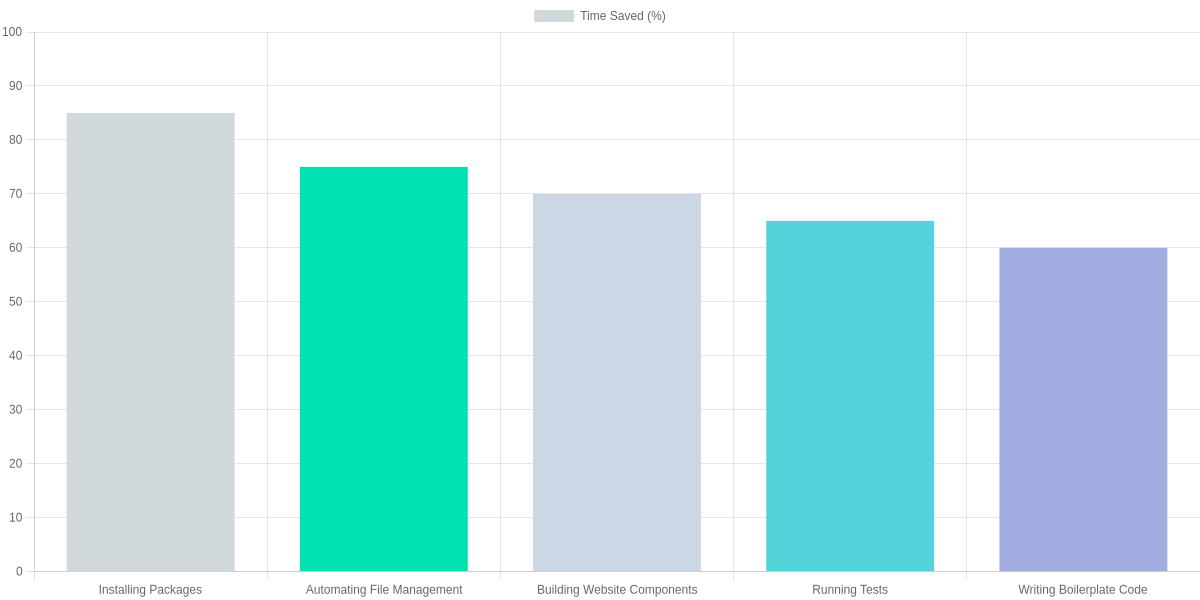
For instance, developers using Claude Code have reported up to 85% time saved when installing packages and 75% time saved on file management tasks. Building website components through Claude Code commands yields a 70% acceleration compared to traditional coding methods. Testing and boilerplate code generation also see impressive time reductions, around 65% and 60% respectively. These numbers demonstrate Claude Code’s capacity to optimize core development activities, making it an indispensable tool.
Ultimately, Claude Code empowers both novices and experienced developers by removing technical barriers. Its natural language processing combined with task automation promotes a seamless development experience. By relying less on memorized commands and more on intuitive interaction, teams can avoid frustration and speed projects toward completion.
Additionally, Claude Code’s permission system ensures safety when executing critical actions. This feature creates a trustworthy workflow where users maintain control, approving sensitive operations while delegating routine ones for swift execution.
As adoption grows, Claude Code continues to evolve with enhanced capabilities tailored to streamline workflows further. Whether you are a product founder without coding skills or a seasoned developer seeking efficiency, Claude Code offers a compelling way to accelerate software creation with less overhead and more clarity.
Permissions Management in Claude Code
Permissions management is a critical part of Claude Code’s functionality, designed to keep you in control while it performs powerful actions on your computer. Since Claude Code can create, modify, and delete files or install software directly, it always respects user consent before executing sensitive operations.
At its core, Claude Code checks whether you have granted permission for a specific action before proceeding. For example, simple actions like creating a file or installing a package might have pre-approved permissions allowing the assistant to run them without interruption.
However, more sensitive actions, such as deleting a file, require explicit approval every time. Claude Code asks for permission via a prompt when it encounters such tasks, ensuring you stay fully aware and can prevent accidental or unwanted changes.
This approach balances security and convenience. Initially, when you’re just starting, Claude Code will request permission before most significant actions to let you understand what is happening. Once you feel comfortable, you can pre-approve certain safe actions to streamline your workflow while still maintaining strict approval checks for anything risky.
How Permission Requests Work
Before executing an action, Claude Code runs a permissions check using an internal list of allowed and disallowed operations. If the permission isn’t already granted, it pauses to ask you directly. You can then grant or deny the request, influencing whether the operation proceeds.
This mechanism ensures that Claude Code never takes action that might compromise your data or system without your knowledge and consent. It acts not only as a task executor but also as a responsible agent respecting your control over the environment.
Examples of Permissions in Action
Create File: Frequently approved as a safe operation for generating new scripts or documents. Claude Code usually proceeds immediately.
Install Package: Often pre-approved if you have configured Claude Code to trust these actions to install dependencies or software components automatically.
Delete File: Treated as highly sensitive and blocked by default until you grant explicit permission. This avoids accidental data loss.
Claude Code’s permission system actually simulates real-world scenarios where each action is reviewed against your preferences or immediate responses. This is how it safely automates complex workflows without risking your data integrity.
Below is a code example illustrating this permission request and execution flow, showing how Claude Code asks for approval before performing actions and handles them accordingly:
Best Practices for Prompting Claude Code
Effective prompting is the secret to unlocking Claude Code’s full power. Rather than vague commands like “Make a website,” provide detailed instructions such as, “Create a responsive personal portfolio website with a navigation bar, about me section, and contact form using HTML, CSS, and JavaScript.” This clarity helps Claude Code understand your exact needs and deliver precise results.
One common mistake is trying to overload a single prompt with too many demands or being overly broad. For example, saying “Automate stuff” is too ambiguous. Instead, specify the task like “Automate daily backup of my documents folder to Google Drive at 8 PM using a bash script.” This approach reduces confusion and speeds up the process.
Another key tip is to mention any specific technologies, frameworks, or languages you want Claude Code to use. This ensures compatibility with your existing environment and prevents unnecessary rework.
Keep prompts straightforward and actionable. Avoid combining unrelated commands in a single prompt. Break down complex workflows into smaller, manageable steps. By doing so, you allow Claude Code to work efficiently and minimize errors.
Remember that Claude Code values precision: the better your prompt, the smoother your automation experience. Always review and refine your instructions based on the outputs you receive, gradually mastering how to communicate with Claude Code like a pro.
